Enable AWS vended metric enrichment
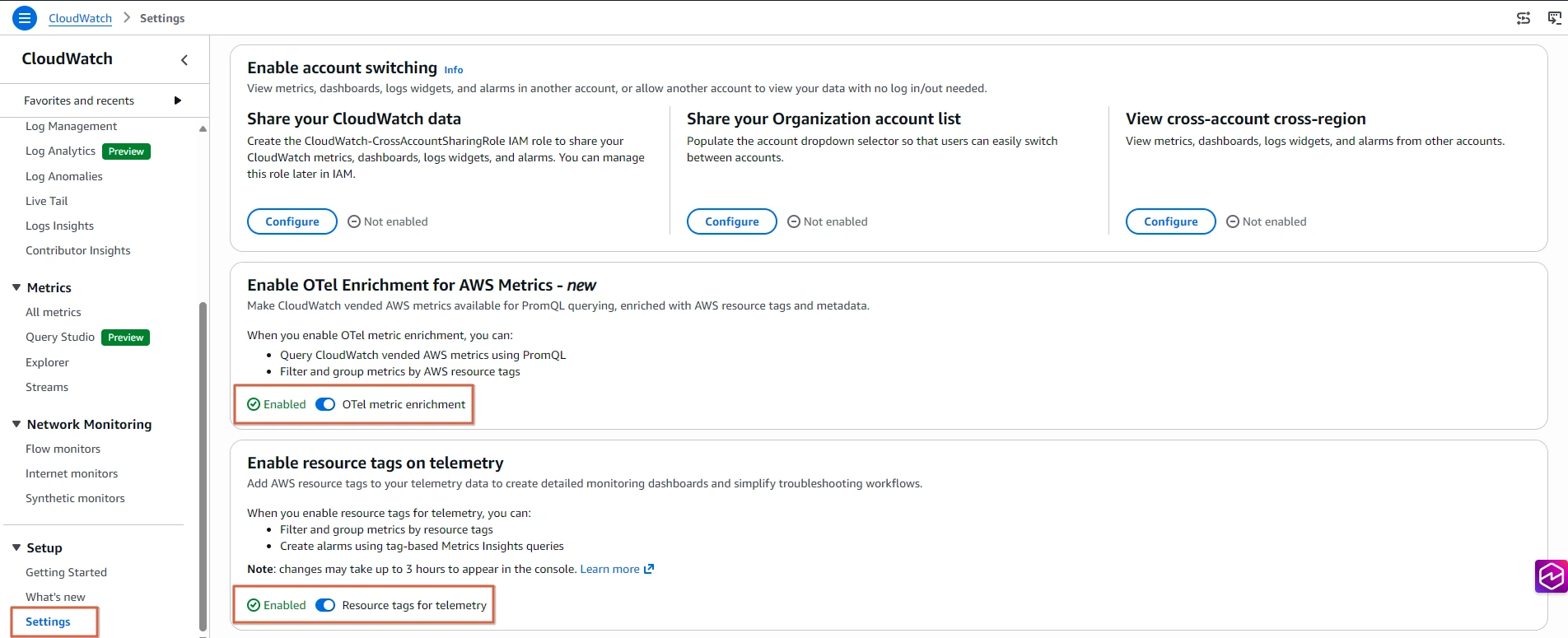
To ingest and query OpenTelemetry metrics in Amazon CloudWatch, there are two account-level settings to enable, which can be done through the AWS console, AWS CLI, or AWS SDK. The first setting enables resource tag propagation from your AWS resources to your telemetry data, the same tags that are visible in AWS Resource Explorer. The second enables OpenTelemetry metrics ingestion for CloudWatch.
Let's enable these two settings. You can use either the AWS Console or the AWS CLI.
Architecture
Amazon CloudWatch exposes a regional OTLP endpoint that OpenTelemetry-compatible collectors and SDKs can send metrics to directly. Metrics are stored in a high-cardinality metrics store that retains OpenTelemetry metric types including counters, histograms, gauges, and up-down counters without conversion. When enrichment is enabled, CloudWatch automatically tags vended metrics with AWS resource context such as account ID, region, cluster ARN, and resource tags from AWS Resource Explorer. This enrichment requires no manual instrumentation, enabling you to query and filter across AWS accounts, regions, and resource tags using PromQL in Amazon CloudWatch Query Studio or Amazon Managed Grafana.
Option A: AWS Console
- Open the Amazon CloudWatch console
 Open EKS console
 - In the left navigation, choose Settings
- In the Resource tags on telemetry section, toggle Enable resource tags for telemetry to On
- In the OTel metric ingestion section, toggle Enable OTel metric ingestion to On
Option B: AWS CLI
Enable resource tags for telemetry data
Enable OpenTelemetry metrics ingestion for Amazon CloudWatch